

In today’s vast keyboard market, consumers often feel overwhelmed by the multitude of choices available. With various types such as mechanical keyboards, membrane keyboards, and electrostatic capacitive keyboards, each has its unique advantages and suitable scenarios. However, figuring out how to select the most suitable keyboard from numerous brands and models has become a dilemma for many. This article will take you on a deeper dive into the characteristics of different types of keyboards, combined with practical usage needs, to provide you with useful tips to avoid pitfalls, helping you navigate the purchasing process and find the keyboard that truly suits you.
1. Category Knowledge
Keyboard Structure: The basic structure of keyboards is generally similar, typically including keycaps, switches, a keyboard matrix, a keyboard controller, a backplate, a top plate, a circuit board, an interface, support structures, and a casing. However, different types of keyboards vary in their specific configurations; for example, backlit keyboards come with dedicated lighting systems.
Keyboard Classification: Keyboards can be classified into mechanical keyboards and membrane keyboards based on their structure. Mechanical keyboards usually offer a better typing feel and greater durability, but they are also heavier and more expensive. In contrast, membrane keyboards rely on flexible circuit membranes to register keystrokes, making them lighter and more cost-effective, but their typing feel and durability are generally not as good as mechanical keyboards.
1. Purchasing Points
When selecting a keyboard, it’s important to focus on aspects such as switch type, actuation force, connection method, keycaps, layout, and backlighting. The current mainstream brands include CHERRY, Razer, Logitech, and Amilo.
Switch Type
The current actuation mechanisms can be broadly divided into two categories: mechanical switches and membrane switches.
Mechanical Switches: Mechanical keyboard switches can be classified into tactile (clicky) switches and linear switches based on the feel. Tactile switches provide a noticeable click sound and a distinct tactile feedback, while linear switches offer a smooth up-and-down action without any tactile bump or click sound. They can further be categorized into black, red, blue, and brown switches based on feel, sound, and key travel. Users who wish to change their switches can opt for hot-swappable keyboards for easy removal and replacement of mechanical switches.
Black Switch: A linear switch that requires more force to press down, with a short key travel and quick rebound, making it suitable for gamers who prioritize speed and prefer a heavier feel; it may not be ideal for beginners, as it can be somewhat tiring to adapt to initially.
Red Switch: A linear switch that feels similar to the black switch but requires less force to press down, offering a lighter feel. It’s suitable for long gaming sessions and office work. For example, one of the official Genshin keyboards in the Hu Tao series uses red switches, providing comfort without causing hand fatigue.
Blue Switch: A tactile switch that produces a loud and crisp sound when bottomed out, making it suitable for competitive gaming and users who seek tactile feedback; however, it’s not ideal for quiet environments.
Brown Switch: A tactile switch that combines the advantages of red and blue switches, offering a lighter tactile feel with less noise when bottoming out, and is known as a “versatile switch.” It is suitable for both typing and gaming, balancing the needs for precision control and sustained typing.
Membrane Switches: Membrane keyboards are quieter, produce less noise, and are designed to be lighter and thinner. They use multiple layers of flexible plastic membranes to detect keystrokes and convert them into electronic signals. However, they typically lack clear tactile feedback and responsiveness, making them more suitable for office environments and public spaces.
Keycaps
Keycaps determine the aesthetic appeal of the keyboard, and their material can influence the feel to some extent.
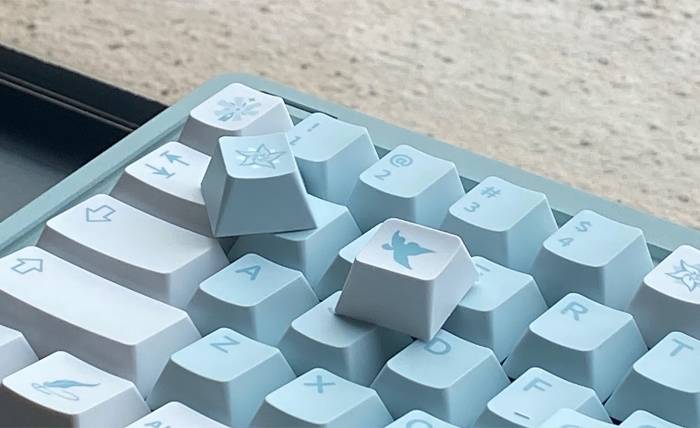
Keycap Materials: Typically includes ABS, PBT, PC, and the less common POM. ABS keycaps are known for their precise colors and delicate feel, but they are low-cost and prone to oil and wear. Currently, the most mainstream keycap material is PBT, which has a rough surface, is less prone to oil, and is heat-resistant. It features various printing techniques such as dye-sublimation, laser engraving, and silk screening, with a wide range of colors and patterns available, making it popular among anime fans. For instance, Genshin Impact keycaps feature various character designs that are very cute and unique, making them highly sought after. PC material is commonly found in transparent shell keyboards, allowing backlighting to shine through completely, but it easily attracts fingerprints and scratches and can oxidize when exposed to air, often turning yellow after a year and a half. POM is rarer, has a good feel, but is more expensive.
Keycap Height: The most common heights are the original CHERRY keyboard height and OEM height, with corresponding keycap slopes of R1, R2, R3, and R4 representing the heights of each row from top to bottom. Additionally, there are keycaps represented by XDA and DSA that are nearly the same height. When choosing, it’s essential to check whether the keycaps fit your keyboard layout, and Mac users should confirm if they include keycap supplements for Mac shortcuts.
Layouts
Meaning: The assembly sequence of the keyboard, which refers to the layout design of the keys. The layout determines the functionality of the keyboard; the more keys it has, the larger the keyboard area and the heavier it is.
100% Layout: 104/108 keys, full-size keyboard, featuring a function key area, main key area, editing key area, and numeric key area. It has the most complete functionality and occupies the most space. The 108-key version includes four additional multimedia keys compared to the 104-key version, making it suitable for office use.
95% Layout: 96/98 keys, removing or dispersing parts of the editing key area except for the arrow keys, resulting in a more compact layout. While this reduces the area, it can lead to accidental key presses and requires some adjustment time.
80% Layout: 87 keys, eliminates the numeric key area, reducing the keyboard size while maintaining a layout nearly identical to the 104-key version. This layout is suitable for both gaming and office use without needing to re-adapt to the keyboard.
75% Layout: 84/86 keys, can meet all the functions of 87 keys when used with the Fn key. This layout is relatively niche and is suitable for programmers, writers, and users who prioritize portability.
65% Layout: 68/71 keys, removes the function key area from the top and redistributes the editing key area.
Buying Recommendations: If you need a full-function area, the 100% layout is recommended. If you are accustomed to a numeric keypad but want a smaller keyboard, the 95% layout is ideal. For those who don’t need a numeric keypad, the 80% layout or smaller is recommended.
That’s all the information. Do you know how to choose a keyboard now?