

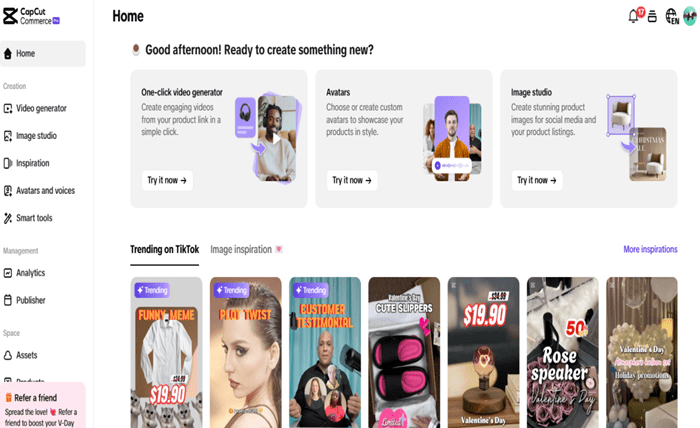
Small businesses can enhance their marketing efforts using a free AI video generator to create engaging content without breaking the bank. These tools help produce professional-quality videos for social media, ads, and product promotions. CapCut Commerce Pro takes this further by integrating AI-powered video generation with its product linking feature, allowing businesses to seamlessly convert product listings into dynamic videos. This technique not only boosts engagement but also simplifies content creation. By leveraging AI-driven video tools, small businesses can improve their brand presence, attract more customers, and drive sales effortlessly. Start using AI video generators today to stay ahead in digital marketing!
Why video marketing matters for small businesses
Video marketing has become an essential tool for small businesses looking to boost brand awareness, engage audiences, and drive conversions. Unlike text-based content, videos capture attention quickly and are more likely to be shared, increasing organic reach. Platforms like YouTube, Instagram, and TikTok make it easier for businesses to showcase products, share customer testimonials, and build trust with their audience.
With tools like a YouTube video editor, even small businesses can create high-quality videos without a hefty budget. By leveraging AI-powered editing tools and automation, brands can streamline content creation and maintain a professional online presence, ultimately leading to higher customer engagement and sales.
Top benefits of AI video marketing for small businesses
-
Cost-effective content creation: AI video tools eliminate the need for expensive production teams, helping small businesses create high-quality videos on a budget. This makes video marketing accessible to startups and entrepreneurs.
-
Saves time with automation: AI automates video editing, captions, and effects, significantly reducing the time spent on manual editing. Businesses can quickly generate promotional videos without technical expertise.
-
Boosts engagement and reach: AI-generated videos are optimized for social media, increasing shares, likes, and comments. Engaging visuals help businesses capture audience attention more effectively than static content.
-
Enhances brand storytelling: AI tools allow businesses to create compelling video narratives with voiceovers, animations, and subtitles. This strengthens brand identity and improves customer connection.
-
Increases conversion rates: Video marketing helps showcase products in action, leading to higher customer trust and purchase decisions. AI-driven personalization also makes ads more relevant to viewers.
-
Seamless integration with e-commerce: Platforms like CapCut Commerce Pro enable businesses to turn product links into videos automatically. This enhances product visibility and improves online shopping experiences.
Free vs. Paid AI Video Generators: Which One Is Right for You?
|
Feature
|
Free AI Video Generator
|
Paid AI Video Generator
|
|
Cost
|
Free tools are ideal for startups and small businesses looking to create videos without financial investment. However, they may lack advanced features required for professional-quality content.
|
Paid tools require a subscription or one-time fee but provide premium features, ensuring better video quality and customization. This investment is worthwhile for businesses focused on branding and high-quality marketing.
|
|
Customization
|
Free AI video generators offer limited templates, effects, and editing tools, making them suitable for basic video creation. Custom branding options are often restricted.
|
Paid versions provide full creative control, allowing users to add unique animations, transitions, and branded elements, making videos more engaging and professional.
|
|
Watermarks & Ads
|
Many free AI video generators include watermarks or ads, which can affect brand credibility and professionalism. Removing them often requires an upgrade.
|
Paid tools eliminate watermarks and advertisements, allowing businesses to create polished, fully branded videos without distractions.
|
|
AI Capabilities
|
Free tools provide basic AI assistance, such as text-to-video conversion and simple animations. However, they may lack advanced automation features.
|
Paid AI video generators offer sophisticated features like scriptwriting, AI voiceovers, and dynamic scene creation, making content production more efficient and high-quality.
|
|
Export Quality
|
Free versions often limit resolution to 720p or lower and may have fewer format options. This can affect overall video clarity and compatibility.
|
Paid tools offer high-resolution exports (1080p, 4K) with multiple format options, ensuring videos look sharp and professional across all platforms.
|
Step-by-step guide to creating videos with a free AI video generator
Step 1: Add a product link or upload media
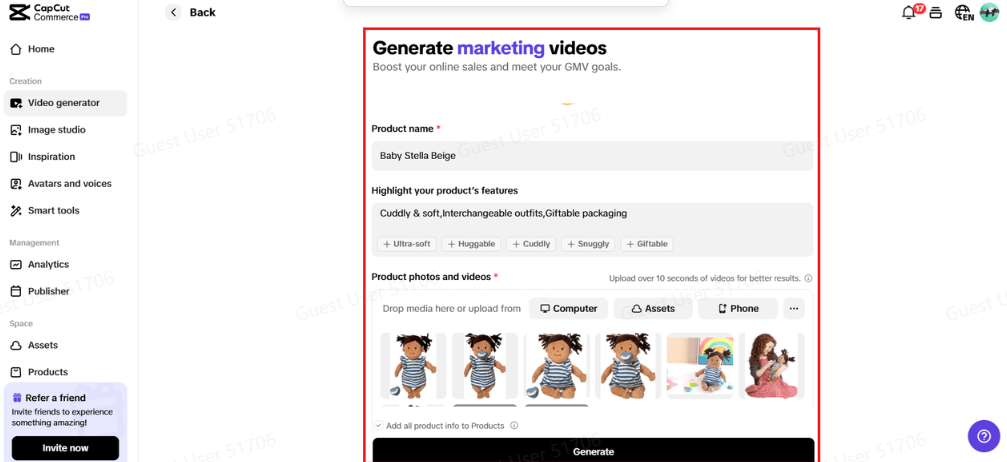
Start by launching the free AI video generator and navigating to the “Video Generator” feature. Here, you can either paste a product link or upload media such as images and videos. The AI will automatically extract key product details like names, features, and images, while the “Auto Enhance” feature optimizes visuals for a professional look. Customize your video further by selecting “Advanced Settings,” where you can modify scripts, avatars, voiceovers, and aspect ratios. To enhance engagement, use AI-suggested stock assets and fine-tune video elements to match your branding. Once ready, click “Confirm” and hit “Generate” to bring your marketing video to life.
Step 2: Create AI videos in a few clicks
After generating your video, explore theme-based categories such as product highlights, memes, text overlays, and TikTok trends. Hover over any template and select “Quick Edit” to quickly adjust key elements like scripts, AI avatars, voice settings, text, and fonts. For deeper customization, click “Edit More” to tweak the aspect ratio, insert stock images, add background music, elements, avatars, and text, and refine playback settings. The AI-powered innovative tools ensure a seamless editing experience, helping small businesses create polished, professional-quality videos effortlessly.
Step 3: Export and share your video
Once satisfied with your AI-generated video, click the “Export” button in the top right corner. You can either “Publish” directly to social media platforms for instant engagement or “Download” the video to your device. Before exporting, choose the resolution, quality settings, frame rate, and format to ensure the best viewing experience across platforms. This step ensures your video is optimized for high-quality playback, making it perfect for marketing campaigns, social media promotions, and product showcases.
Conclusion
AI video marketing is a game-changer for small businesses, making content creation faster, easier, and more cost-effective. A free AI video generator helps businesses produce engaging videos without expensive resources, while paid options offer advanced customization and high-quality exports. Tools like CapCut Commerce Pro take it further by converting product listings into dynamic videos and enhancing e-commerce strategies. By following simple steps, adding product links, customizing templates, and exporting high-quality videos, businesses can create compelling marketing content effortlessly. Whether using free or paid AI video tools, leveraging AI-powered video marketing can boost engagement, improve conversions, and establish a strong brand presence.