

Minimalist FocusMinimalist Focus
  • Home
  • News
  • Entertainment
  • Fashion
  • Health
  • Tech
  • Tips
  • Travel
  • More
    • Culture
    • Design
    • Life
    • Work
Facebook Twitter Instagram
Minimalist FocusMinimalist Focus
  • Home
  • News
  • Entertainment
  • Fashion
  • Health
  • Tech
  • Tips
  • Travel
  • More
    • Culture
    • Design
    • Life
    • Work
Facebook Twitter Instagram
Minimalist FocusMinimalist Focus
Home»All»How to Screen Record on iPhone: A Step-by-Step Guide
All

How to Screen Record on iPhone: A Step-by-Step Guide

By KathyDecember 9, 20232 Mins Read
Facebook Twitter Pinterest LinkedIn Reddit Telegram WhatsApp Email
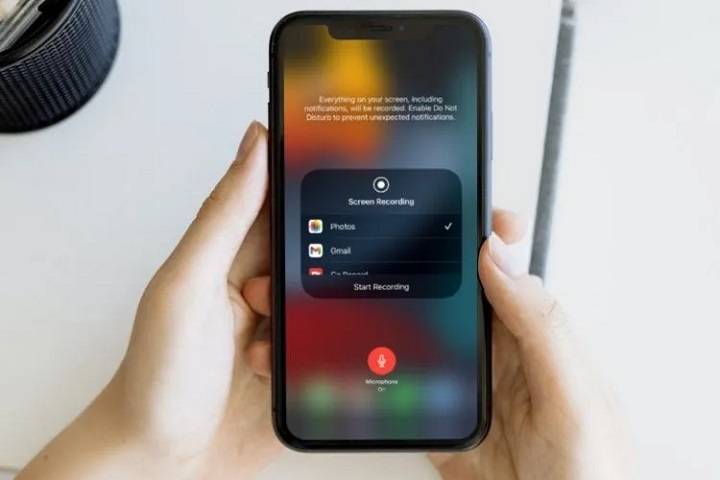
How to Screen Record on iPhone A Step by Step Guide
Share
Facebook Twitter LinkedIn Pinterest Reddit Telegram WhatsApp Email

Screen recording on your iPhone allows you to capture moments, create tutorials, or share interactions. Follow these steps to master this handy feature.

Access Control Center

  • Open “Settings” on your iPhone.
  • Tap “Control Center” and then “Customize Controls.”
  • Locate “Screen Recording” and add it by tapping the green plus icon.

Start Recording

Start Recording

  • Swipe down from the top-right corner to access the Control Center.
  • Tap the circular recording icon. A countdown will begin, giving you time to prepare.

Control the Recording

  • To record audio, long-press or 3D Touch the recording button.
  • Select “Microphone Audio” to enable audio recording.

Stop and Save

Stop and Save

  • After recording, tap the red status bar or go back to the Control Center.
  • Press the “Stop” button to finish recording. Your video will be saved to your Photos app.

Also Read:

  • How Fast Is Mach 10: Exploring the Speed and Impact of Hypersonic Travel
  • Cinnamon Toast Crunch Crocs: A Tasty Twist to Footwear Fashion

Tips for Effective Recording:

  • Ensure sufficient storage space before recording.
  • Avoid capturing sensitive or private information.
  • Experiment with different recording settings for better quality.

Screen recording on your iPhone is a versatile tool. Whether it’s for instructional content or preserving memorable moments, mastering this feature opens up a world of possibilities.

Remember, screen recording can be a powerful asset, so use it wisely and enjoy sharing your iPhone experiences effortlessly.

Share. Facebook Twitter Pinterest LinkedIn Reddit Telegram WhatsApp Email
Previous ArticleHow Fast Is Mach 10: Exploring the Speed and Impact of Hypersonic Travel
Next Article The Tote Bag Marc Jacobs: A Style Icon for Everyday Chic
Kathy

Meet Kathy, the mindful mind behind the words at minimalistfocus.com. With an innate ability to distill the essence of life down to its purest form, Kathy's writing resonates with those seeking clarity in a cluttered world.

Related Post

Digital Minimalism: How to Declutter Apps, Reduce Screen Time, and Simplify Your Digital Life

February 21, 2026

Walmart Hidden Clearance Today: How to Find Secret Deals Walmart Doesn’t Advertise (Updated Daily)

February 10, 2026

Bringing it Down to Basics: Here Are the Key Elements of Any Safe Online Sports and Digital Gaming Platform

January 2, 2026

Most Popular

Health

Why More People Are Turning to IV Infusion Therapy in Wisconsin for Stress and Recovery Support

By KathyMarch 20, 2026

IV infusion therapy in Wisconsin is becoming a go-to option for individuals looking to support…

Common Methamphetamine Interactions That May Raise Health Risks

March 20, 2026

The Intentional Bathroom Remodel: What It Really Costs and Why It Matters

March 19, 2026

Your Basement Is Space You’re Paying For but Not Actually Living In

March 19, 2026
Our Picks

LG Redefines Professional Workflows with the New UltraFine evo 6K Monitor

April 15, 2026

The Heritage and Wellness Benefits of Premium Al Madina Ajwa Dates

April 15, 2026

Turning Waste into Wealth: The Future of Smarter Material Recovery

April 15, 2026

Top Picks

Thailand Will Completely Redefine Your Physical Exercise  

March 30, 2026

Uncover How Early Septic System Treatment Prevents Drain Field Failure

March 30, 2026

Specifics of relocating a retail shop

March 28, 2026

Subscribe to Updates

Get the latest creative news from Minimalistfocus about Business, Travel, Tips and More.

  • About Us
  • Archives
  • Contact US
  • Privacy Policy
Minimalistfocus.com © 2026 All Right Reserved

Type above and press Enter to search. Press Esc to cancel.