


SoundCloud has turned into a cool platform, whereby music lovers can upload, share, and discover music from different artists around the globe. Still, the service is not perfect in many aspects, and the occasional troubled situations can infuriate and confuse users.
“If you have ever found yourself asking, “Why is SoundCloud not working?” know that you are not alone!” In this article, we explore a few other solutions that allow you to troubleshoot the issue within SoundCloud not working on either a PC or mobile device.
Solutions to Fix SoundCloud Not Working on Computer Browser
SoundCloud problems on your computer can be resolved using several workarounds. Here are some effective solutions:
1. Check Your Internet Connection: Poor or unstable internet connection would lead to problems while working on SoundCloud. Ensure your internet connection is stable, and try reloading the page.
2. Clear Browser Cache and Cookies: Temporary files and cache may sometimes prevent the website from being opened. Clear the cache and cookies of the browser, restart the browser, and see if SoundCloud is working properly.
3. Disable Browser Extensions: Certain browser extensions may be conflicting with SoundCloud. Temporarily disable all your extensions, especially the ad blockers, and check if SoundCloud would work properly.
4. Update Your Browser: An outdated browser could cause some compatibility issue. Keep in mind that the best experience on SoundCloud involves the latest browser version.
5. Try Another Browser: If SoundCloud is still not working, try running it through another one. This will help figure out whether the issue is limited to that browser.
Solutions to Fix SoundCloud Not Working on Phone
For Android/iOS users, follow these steps to troubleshoot SoundCloud if you are having any problems here:
Check the Network
First and foremost, make sure that your mobile device is connected to a steady internet connection. Check if you can switch between Wi-Fi and cellular data without the issue persisting. A weak signal can lead to SoundCloud not working effectively.
Update the App
An outmoded version of the app in use could hinder its functioning. For updating, check the Apple Store for iOS or the Android Play Store and download latest updates if available. This can often resolve bugs and improve performance.
Clear App Cache
Clearing the app cache can help with issues of stored data. With an Android device: go to Settings > Apps > SoundCloud > Storage > Clear Cache. For iOS, one can uninstall and reinstall the app in certain cases to clear out the cache.
Uninstall and Reinstall
You must force-quit-and-restart the app if SoundCloud still isn’t working. The app will return to its factory defaults and any offending settings responsible for the issue will be reset. After reinstalling, log back into your account to check if the problem still persists.
Download SoundCloud to MP3 and Listen to Music Without SoundCloud Service
If you don’t want to try out those methods, you can download your favorite SoundCloud music for offline listening and you may find TuneFab SoundCloud Music Converter useful. It converts SoundCloud playlists into MP3s so you can enjoy your favorite music track without SoundCloud itself.
Steps to Use TuneFab SoundCloud Music Converter
1.Download and install TuneFab SoundCloud Music Converter: You start with downloading the software from its official site and installing it on your PC.
2. Launch the Program: Open TuneFab SoundCloud Music Converter. You will see a very convenient interface that allows easy navigation.
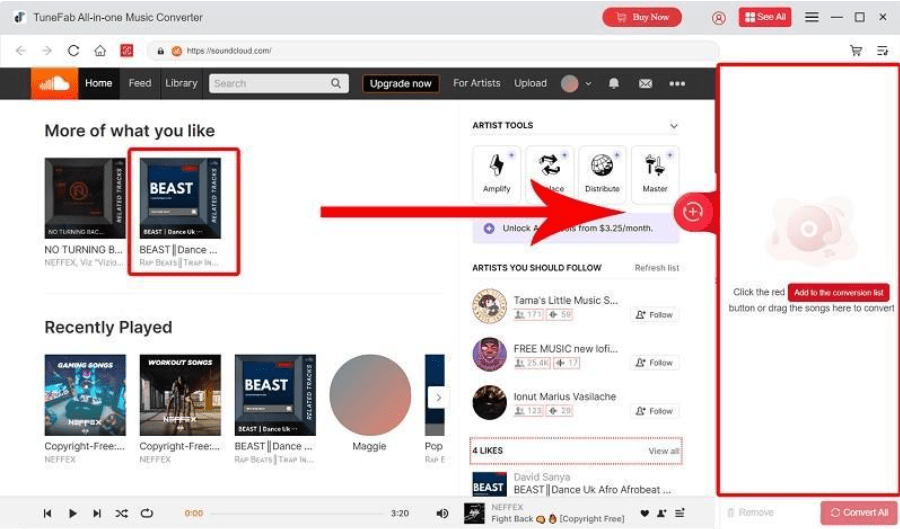
3. Add SoundCloud Music: Go to the playlist or song you want to download, drag it to the conversion list on the right side.
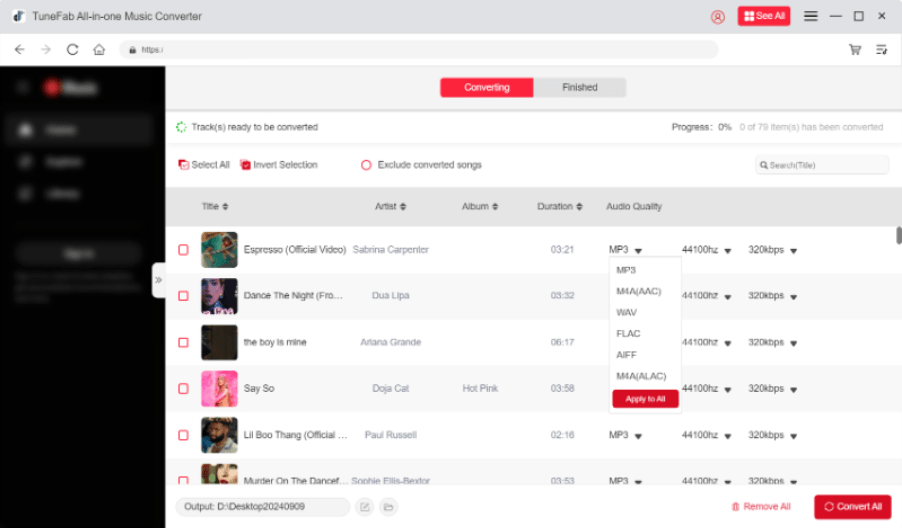
4. Select Output Format: Choose your desired output setting (like MP3) by clicking on the “Output Format” option.
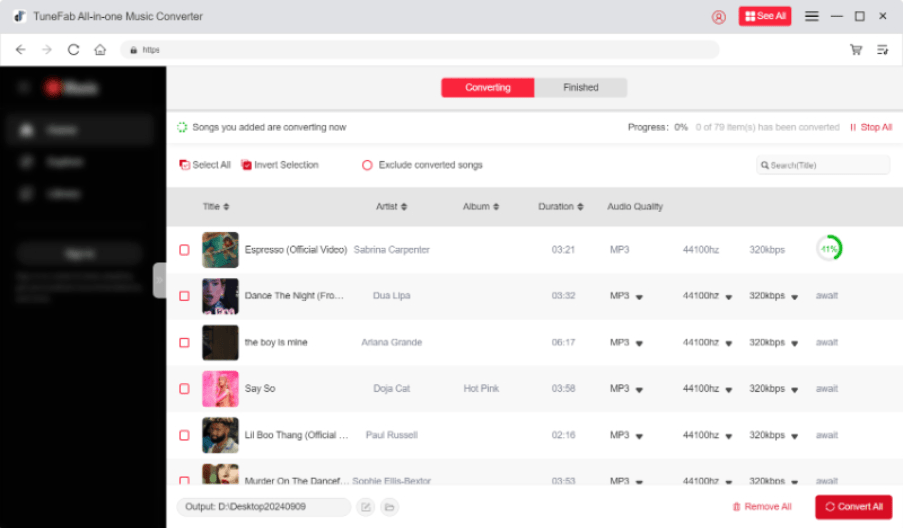
5. Start conversion: By pushing the “Convert All” button. The conversion will start, and once it is completed, the converted version of your music will be available in the selected format.
Applying relevant steps will provide you with a simple remedy to download your favorite tracks from SoundCloud and listen to them offline, even when SoundCloud is malfunctioning.
All in all, when SoundCloud isn’t working, there are various solutions: fixes for that while using your computer and fixes for that while using your mobile way. Starting from checking the internet, using TuneFab SoundCloud Music Converter, you would obviously keep your music experience uninterrupted.