

Many smartphone users lose their memorable photos and videos without realizing it. Many times, a wrong tap or system glitch makes precious memories disappear instantly. It feels stressful when your favorite moments disappear, especially with no backup available.
Nevertheless, several quick ways can bring those lost images and clips back. A right Android data recovery app for Android and smart recovery steps can get those deleted files back. This guide will explain why media loss happens and help you recover multimedia safely.
Part 1. Why Does Media Loss Occur on Android Devices?
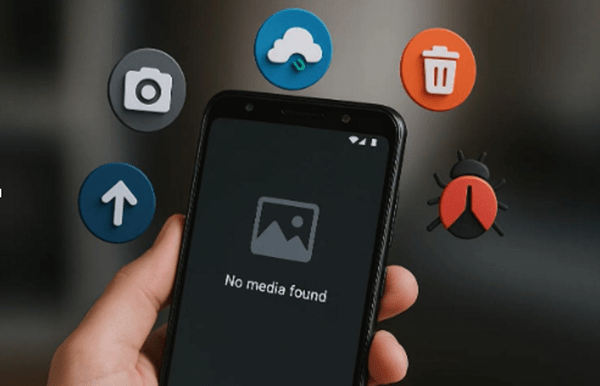
Media loss can happen due to various reasons, even without warning or a visible reason. In this section, you will understand a few causes that help you act and improve your photo recovery success rate:
- Cache Clearance: Clearing the app cache can sometimes erase temporary media stored inside your gallery. It usually happens when using cleaning apps to free phone memory.
- System Updates: Major Android updates can also cause data loss during the installation process. When not backed up, essential media files may disappear after the update completes.
- File Corruption: Besides, shutdowns or storage errors can make photo and video files unreadable. Once corrupted, those files can vanish from the gallery or display incorrectly.
- App Issues: Crashes in gallery or camera apps can sometimes delete media without user action. These bugs may hide or remove recent captures from your visible media list.
- Virus Attack: Malware infections can also damage or erase your saved photos and videos. Such attacks target personal files, which cause sudden and hidden data corruption.
Part 2. What Are the Best Built-in Options to Explore?
Android devices offer some native features that can help with quick data recovery. So, the following easy options let you restore deleted photos or videos without using extra tools.
1. Restore Media from Google Photos
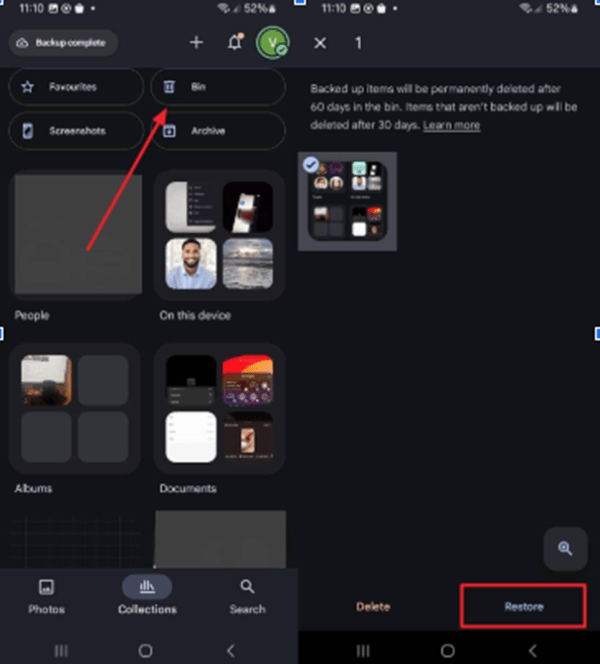
It is a powerful cloud service that keeps your pictures safely stored online. The app keeps removed files in the Trash folder for up to 60 days safely. This feature helps users undo accidental deletions without using extra apps or tools. Yet, you can only restore media when you previously backed it up. Follow the steps below to use this photo recovery method without hassle:
Instruction. As you access the “Google Photos” app main screen, tap the “Bin” section and choose your desired deleted media. Upon selecting them, simply press the “Restore” option to get them back.
2. Restore Media from Gallery
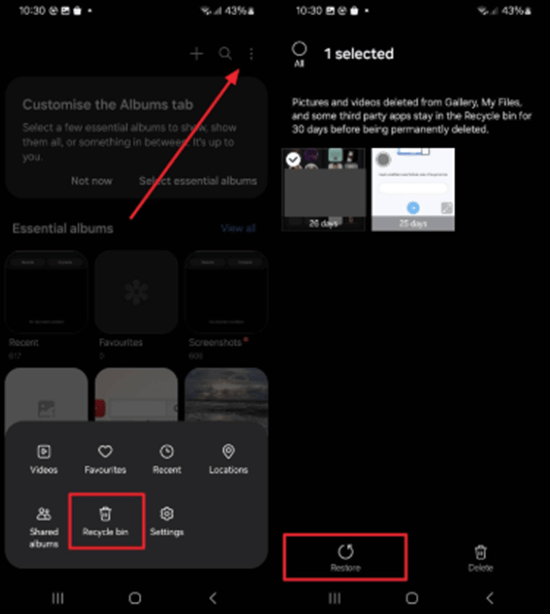
Most Android phones also include a native “Recently Deleted” folder in the Gallery app. This feature stores deleted photos and videos for around 30 days safely. Users can easily check this section and restore their lost files instantly. It’s a convenient choice when quick data recovery is needed without extra software. Take guidance from the following instructions to restore your deleted media from the gallery:
Instruction. Upon accessing the “Gallery” app, head to the “Recycle Bin” section by tapping the “Three Dots” icon. When you see and choose the deleted media, press “Restore” to recover it.
Part 3. Unlocking Deep Recovery: Third-Party Tools You Need
When native options cannot find your lost files, deep recovery tools become essential. At this point, external apps can scan your device storage to locate and restore deleted media. One trusted choice among users is the Dr.Fone Recovery App, known for its powerful features. In addition to media retrieval, you will also be able to recover many other deleted data, like messages.
It can also restore deleted files from the phone’s recycle bin instantly. Even accidental deletions in social or messaging apps can be reversed using the scan. After scanning, the tool shows all recoverable files grouped clearly by data type. You can preview thumbnails or names before selecting items to restore successfully. This file recovery app offers multiple save options, including internal storage or a new folder.
Key Features
- Broad Compatibility: Supports more than 6,000 Android devices from top global brands effortlessly.
- Robust File Recovery: Finds and retrieves deleted or lost PDFs and other essential files.
- Preview Restore Data: Lets you preview all types of restored data to ensure the correct data is restored.
Part 4. Tips for Avoiding Data Overwriting Issues
After deleting photos or videos, every new action on your phone matters. Following these simple file recovery tips will help you stop new data from replacing your lost media:
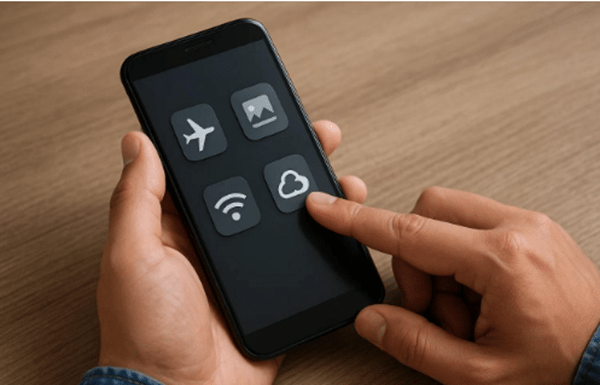
- Stop Usage: Avoid using your phone after losing media files to prevent new data. Continued phone activity can overwrite existing data, making recovery significantly more difficult.
- Disable Internet: Disable Wi-Fi and mobile data to stop background downloads immediately. Automatic updates may replace deleted media, lowering your recovery success rate.
- Avoid Apps: Do not open or install new apps after losing photos or videos. New app data may overwrite old memory areas, harming your recovery chances.
- Use Airplane: Switching to airplane mode can pause data writing and background activities. It keeps the storage stable, improving the chance of better recovery.
- Backup Now: Create a quick backup of the current media to prevent further accidental loss. Backing up protects existing files while you prepare for safe recovery.
Part 5. Step-by-Step Guide to Photo Recovery
Retrieving deleted media files is effortless when you follow the right process carefully. Upon choosing the right photo recovery tool, such as Dr.Fone App, you can restore lost media quickly. This section explains each step clearly so anyone can recover deleted files without confusion:
Step 1. Open the Photo Recovery App
Upon running and accessing the Dr.Fone App, go to the “Recover Deleted Data” section. Choose “Photos” and “Videos” as the data you want to retrieve and grant the necessary permissions by tapping “Allow.”
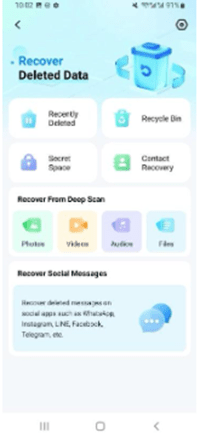
Step 2. Scan and Choose What to Restore
The app will automatically initiate scanning your device for deleted media files. As the results appear, choose your desired photos for retrieval and tap the “Recover” button.
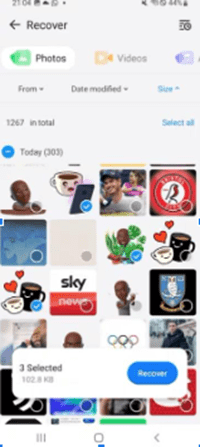
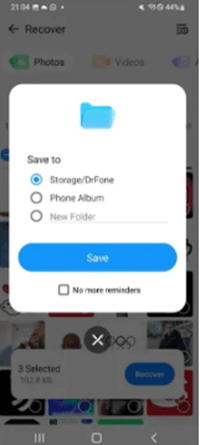
Step 3. Restore and Save Your Deleted Media
Afterward, choose where you’d like to store the recovered media and press “Save.” Your selected files will then be restored directly to your Android phone.
Conclusion
To sum up, this guide has explored ways to recover precious photos or videos. Upon following the right steps and using trusted solutions, you can bring those memories back. Always act quickly to avoid permanent data loss and overwriting issues. For the best results, try Dr.Fone App, a trusted Android data recovery app for Android. It is designed to restore deleted files easily and securely anytime you need.