

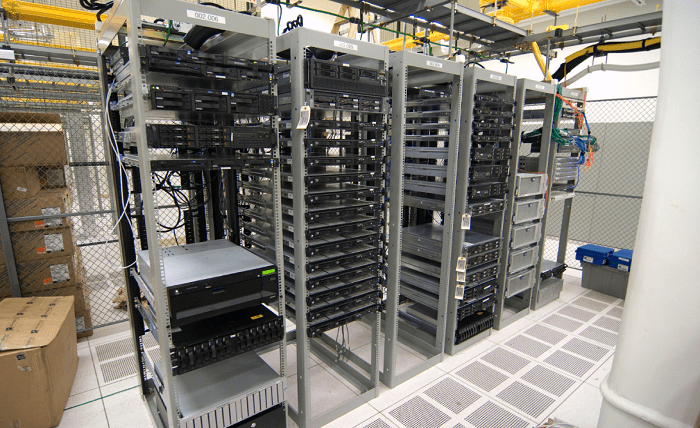
A server rack organizes and houses servers, network switches, and other IT equipment within a physical frame or enclosure. These racks are essential in data centers and IT infrastructures for systematic hardware arrangement, airflow optimization, cable management simplification, and security enhancement.
What is a computer rack?
Cabinets provide a structured framework for securely mounting electronic hardware devices. Made typically of steel or aluminum, it accommodates equipment of standard sizes, measured in “U” units, with one U equaling 1.75 inches. A rack’s structure includes rails, mounting brackets, and often doors and side panels for enclosed models. Users can add shelves, cooling fans, and power strips to increase functionality.
The History and Evolution of Computer Racks
Originally from the telecommunication industry, racks for computers have evolved from simple frames to sophisticated enclosures for server environments, illustrating the concept of what is a rack computer. Technological advancements have significantly altered frame designs to meet the needs for efficient cooling, cable management, and security.
How to choose a computer rack?
Choosing the right rack systems requires considering size, ventilation, accessibility, and security, amount of servers:
- Size must accommodate current and future equipment.
- Ventilation is crucial to prevent overheating.
- Accessibility is important for maintenance and upgrades.
- Security features like lockable doors protect against unauthorized access.
Matching the cabinet choice to user or organizational needs optimizes IT equipment operation and management. If you want to know how many servers can fit in a rack consider exploring this article: https://jt.org/how-many-servers-can-fit-in-a-rack-capacity-explained-and-how-to-optimize-it/.
Types of computer racks
There are four main categories of cabinets: open frames, enclosed cabinets, floor-standing, and wall-mounted.
- Open Frames offer easy access but minimal protection, lacking sides and doors.
- Enclosed Cabinets secure equipment with doors, side panels, and cooling solutions.
- Floor-standing frame accommodates many devices for heavy-duty use.
- Wall-mounted equipments save floor space, suitable for smaller setups or limited areas.
Each type presents its own set of benefits and drawbacks concerning accessibility, airflow, security, and space.
What is a computer rack used for?
Cabinets host servers, networking equipment, and telecommunications devices, organizing and protecting equipment, facilitating efficient cooling, and enabling maintenance and upgrades. The equipment design significantly affects IT infrastructure performance and reliability.
Conclusion
Cabinets, often referred to when considering what is rack in computer terminology, play a critical role in efficient and secure IT infrastructure operation. They organize and protect electronic equipment, contributing to data center and IT system performance. Correct computer cabinet selection and use are key to optimizing IT operations and ensuring hardware longevity and reliability.