

Online gaming requires performance. As more gamers play online games, the need for dependable, fast connections has grown. Many gamers use VPNs to bypass geographical restrictions and access other game servers. However, certain VPNs may slow network speed and create latency during important gaming times. This post will evaluate iTop VPN, the best gaming VPN in 2024, and its features for lag-free gaming.
What is a No Lag VPN?
No-lag VPNs optimize network speeds and reduce latency (ping) to improve gaming. Ping is the time between a player’s activity and the game server’s response, measured in ms. A ping between 15ms and 45ms is ideal, although most gamers accept anything under 100ms. VPNs route internet traffic via servers closer to gaming servers, reducing data travel distance and latency. This closeness may increase connection quickness and game smoothness. No-lag VPNs stabilize connection rates and prevent ping spikes, which may cause game lag. Competitive online gaming requires this since even a little latency may cause missed actions or reaction delays.
Features of iTop VPN: Best No Lag VPN for Gaming
In 2024, players use iTop VPN for lag-free gaming. Fast speeds, large server network, and strong security:
Fast Speed
With over 300 Mbps peak throughput on a 1 Gbps line, iTop VPN delivers fast connections. This speed ensures smooth gameplay and outperforms most internet connections. To provide latency-free gameplay, iTop VPN maintains a 20-ms ping rate.
Extensive Gaming Servers
Over 1800 servers in over 100 countries are available from iTop VPN. This wide network lets users connect to servers near their game servers, maximizing speed and minimizing latency.
Multi-Device Support
ITop VPN supports five simultaneous connections on web browsers, Windows, macOS, iOS, Android, and iOS. Its interoperability allows desktop and mobile gaming, which benefits multi-device users.
Unblock Global Content
In addition to gaming, iTop VPN enables foreign websites, social networking, and streaming services simpler to access. It bypasses geo-restrictions and provides education and entertainment.
Optimized Servers
ITop VPN offers streaming and gaming dedicated servers. These servers are designed for low latency and fast, dependable connections so you can play and broadcast without interruption.
Split Tunneling
This option lets you pick which games or apps use your internet and which use the VPN. You can enhance gaming speed and performance without losing VPN security for other online activities.
Security Features
iTop VPN’s security features include strict no-log rules, a kill switch that disconnects you from the internet if the VPN connection is lost, and an ad-block tool to keep your online activity private.
How to Use iTop VPN for a Lag-Free Gaming Experience
Using iTop VPN is a straightforward process that can greatly improve your gaming experience by reducing lag and enhancing connection stability. Here’s a detailed guide on how to use iTop VPN for a seamless, lag-free gaming experience:
Download iTop VPN
Installing iTop VPN on your chosen device is the first step. Because iTop VPN works with Windows, macOS, Android, and iOS, it is adaptable and available on a range of devices. Download the compatible version for your system by going to the official iTop VPN website. The installation procedure is simple to understand and easy to utilize.
Install and Launch
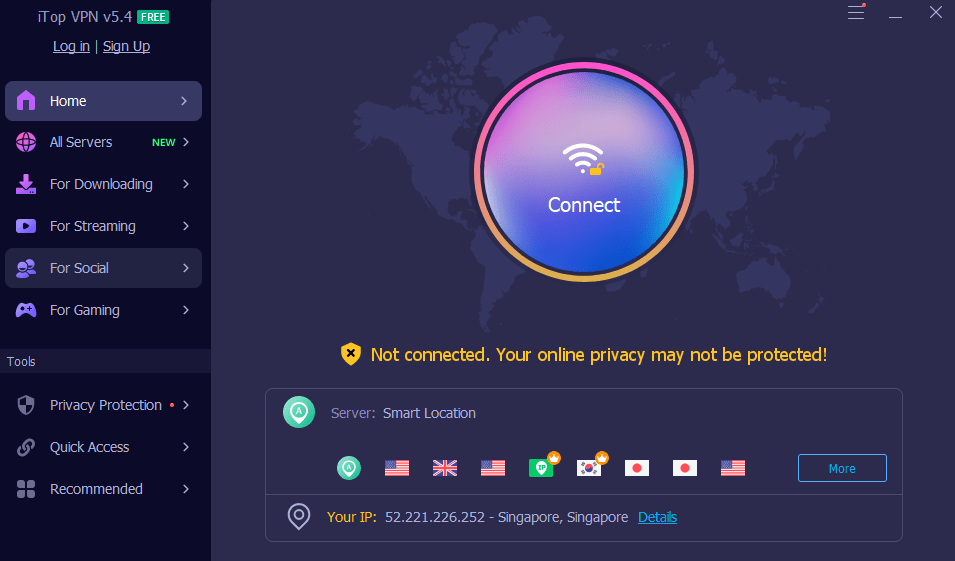
Install iTop VPN on your device when it has been downloaded, then open the software. A user interface that is clean and simple to use will welcome you.
Select a Server
To choose a server, go to the app’s “Smart Location” section. For best results, you may choose the software’s smart location recommendation or go with a free no-lag server. By using a server that is nearest to your game server, this function lowers latency and increases performance.
Connect to the Server
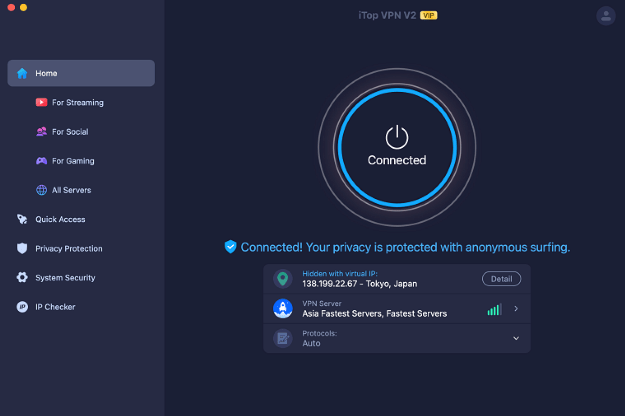
Click “Connect” to initiate a connection after choosing a server. After that, iTop VPN will turn on VPN security, safeguarding your online activity and enhancing your gaming connection.
Monitor Connection
The app’s dashboard may display your new virtual IP address and server location once you’ve joined. To guarantee consistent performance throughout your gaming experience, keep an eye on your connection.
Adjust Settings
Investigate the options and features of iTop VPN, including split tunneling, which lets you choose which applications utilize the VPN connection and which ones use your home internet connection. This may secure your other online activities while optimizing speed and efficiency for gaming.
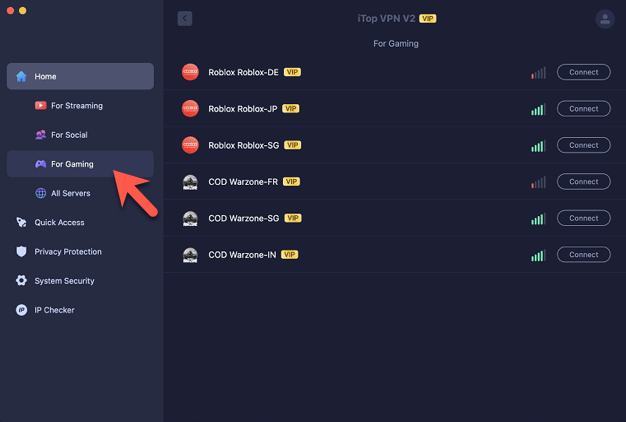
VIP Account and Gaming Servers
Upon upgrading to a VIP account, you will have access to the “For Gaming” section’s VIP-only gaming servers. These servers provide even greater speed and stability since they are particularly designed with gaming in mind.
Customize Your Experience
You may customize iTop VPN’s settings to meet your demands based on your online activity and preferred games. To prevent distractions while gaming, you may want to switch on Ad-Block or activate the Kill Switch function, which immediately disconnects you from the internet if your VPN connection is disrupted.
Conclusion
When playing online games, an abrupt spike in ping may degrade your experience and lower your rating. Utilizing a no-lag VPN, such as iTop VPN, may lessen these dangers by providing a large worldwide server network, decreasing ping times, and providing superior security measures that prevent data breaches. With more than 8 million downloads and highly regarded features like privacy protection, lag-free gaming, and dependable connections, iTop VPN is a great option for gamers looking for a no-lag VPN in 2024.