

In today’s world, videos can help with our work in many fields, such as rendering information, promoting products, and a lot more. However, making a good video is rather a difficult task. Traditionally, it requires shooting footage, writing scripts, and then putting things together, which may involve professional knowledge. But now with the help of AI creation tools, this is no longer a hassle.
With so many options available, it is not easy to select the best AI video generator. A good one should excel in video quality, processing speed, stability, customization, and prices. If you don’t know how to choose one, then this article is a must-read for you. Here the 5 best AI video makers are introduced one after one with their pros and cons. Don’t miss out on such a treasure!
1. Virbo AI Video Generator – Best AI Tool for Video
Rating: 4.8/5
The first on today’s list is the best AI video generator you can find online. It’s called Virbo AI Video Generator, an AI-powered program that can turn ideas into videos in minutes. All you have to do is type a prompt or upload an image, and the tool will exploit its cutting-edge AI technology to give you an incredible video that’s the summation of your ideas!
The AI video generator offers excellent features, such as fast video generation, innovative text-to-video AI conversion, and hundreds of realistic AI avatars and templates to serve as a canvas when making your video. Additionally, perfect lip-sync and natural body movements also make Virbo the best AI video generator and a one-of-a-kind tool!
Pros
- Create stunning videos from text/images in just one click.
- Offer more than 400 preset templates as a canvas to start with.
- Generate lifelike AI avatars for presenting information in videos.
- Support over 70 languages for voiceover to cater to a global audience.
- Produce videos in resolution of up to 1080p, guaranteeing a better experience.
- Allow for customization of background, music, sticker, and effects.
Cons
- A few users might find that the AI video generator doesn’t support their native language, but these are typically rare or less commonly spoken.
A Quick Guide on How to Use Virbo to Generate Videos in Minutes
Now in this section, you’ll learn how to use the best AI video generator. Just have a computer ready and connect it to the Internet. The tool generates your video in just three steps.
Step 1. Open Virbo AI Video Generator
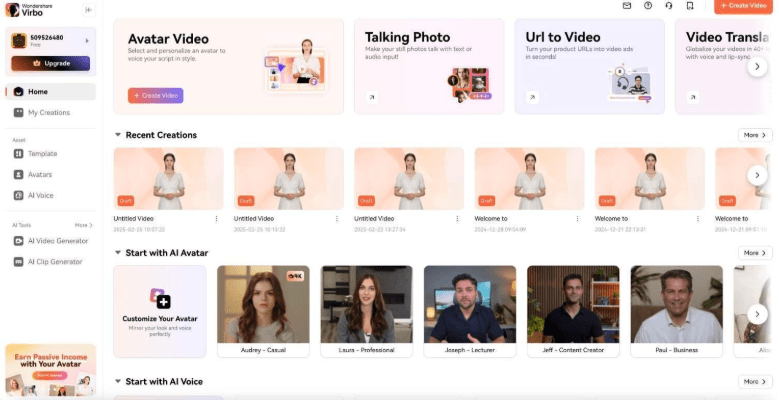
Go to the AI video maker and open a free account with the platform. Then click the “+Create Video” button at the top right of the generator’s interface.
Step 2. Upload Image and Create Script
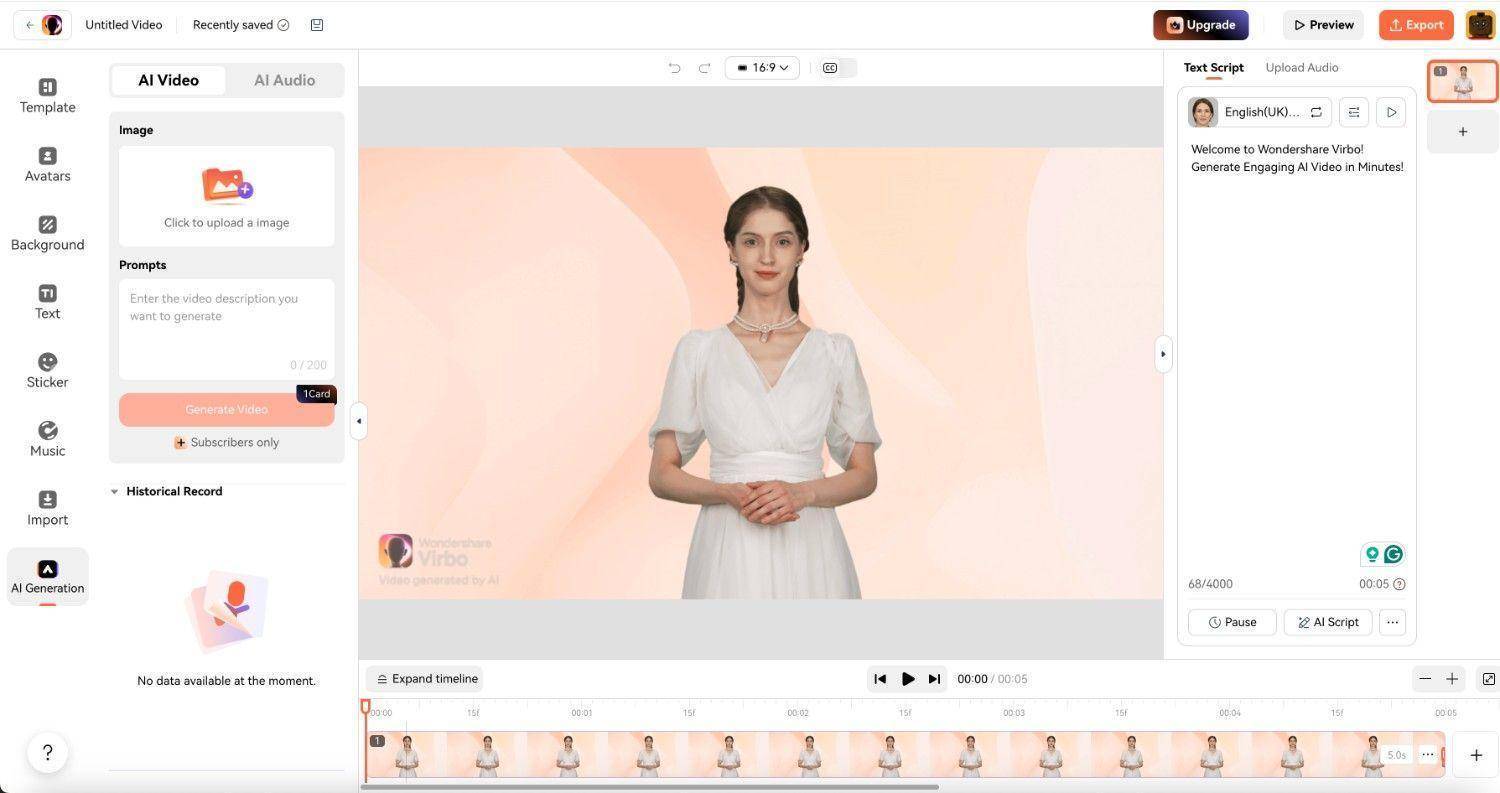
Click “AI Generation” on the left panel again, then click the “Click to upload an image” button to open your Explorer or Finder window and load the image you want to turn into a video. Next, type out the script you want the avatar to read or use the AI video generator’s “AI Script” button to generate one for you automatically. When everything is done, click “Generate Video”.
Step 3. Generate and Save Video
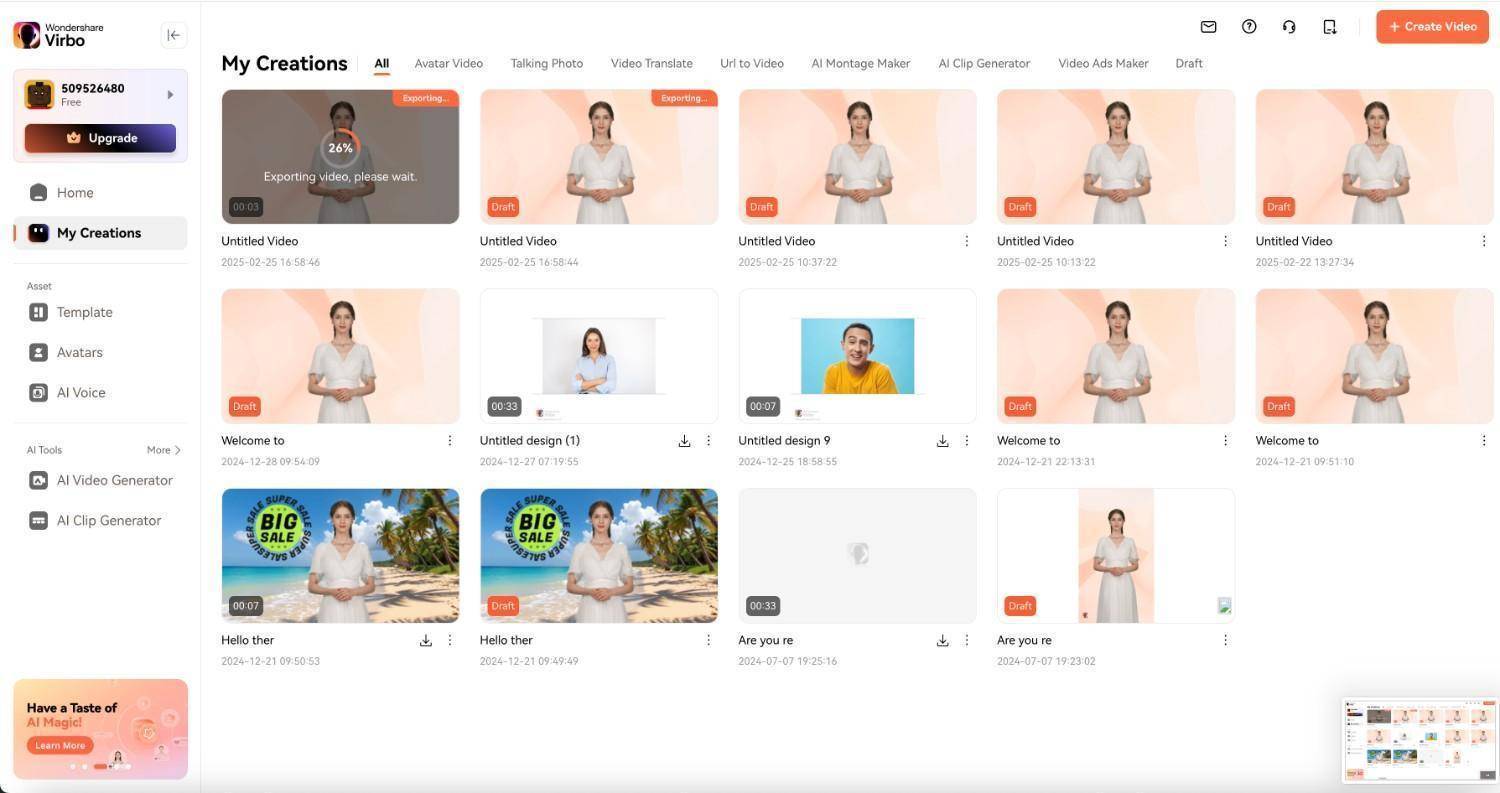
After the video is generated, click the “Export” button at the top right of the tool’s interface. Finally, you’ll be taken to the “My Creations” page, where you can download and save the video to your computer.
2. Sora – Best for Text-to-Video Creation
Rating: 4.5/5
You’re familiar with ChatGPT, aren’t you? But have you ever heard of Sora? It is an AI video generator model of OpenAI, the company that developed ChatGPT. The AI video generator online turns your text prompts into visually compelling videos. If the output doesn’t satisfy you, you can just type in another prompt to let Sora modify the video until it meets your needs. And just like ChatGPT, Sora is easy to use with very few distractions on its interface.
However, the most distinct weakness of Sora is that it doesn’t offer a video editor for you to freely adjust the elements in the generated video. Sometimes you may keep inputting text prompts for modification, only to find that the result still fails to meet expectations. In that case, it is recommended to try other tools like Virbo.
Pros
- Efficient text-to-video capability that makes room for creativity.
- Generates photo-realistic and high-quality videos that boast incredible detail.
- A simple and intuitive interface makes it easy to use.
Cons
- Generated videos struggle to maintain object consistency across frames.
- Users can’t adjust details precisely according to what’s envisioned.
- Watermarks on the output of the lowest-paid plan.
3.YouCam Video: AI-Powered Video Editing for Creative Transformations
4. Synthesia – Best for Professional Production
Rating: 4.5/5
For anyone who wants to generate studio-quality videos, Synthesia is the best AI video generator. With an impressive number of AI avatars and voiceovers in over 140 languages, there’s no shortage of options for you to make videos with AI. Whether you want to create promo videos, educational content, or purely entertaining clips, Synthesia can always satisfy you in a short time!
But to access Synthesia’s full features, you have to subscribe to its premium plans. Here comes the problem. The prices for its plans are higher than other options for video generation, which might not be a suitable pick for those with a tight budget.
Pros
- Generate detailed videos with AI in minutes.
- Offer highly customizable AI avatars for different needs.
- Come with pre-designed templates for content creation.
Cons
- Require a long time to master this AI video generator.
- High subscription fees for individual users or budding businesses.
5. Invideo AI – Best for Fast Video Generation
Rating: 4.3/5
Invideo AI is also one of the best AI video creators and a user-friendly tool for video production. The AI video generator online uses your prompts to generate unique videos that stand out. You’ll be asked to add specifics like the length of the video, the voice-over accent, the social media platform you might post on, and more. This allows the AI video generator to create clips perfectly tailored to your ideas, so it’s highly detail-oriented.
Pros
- Leverage text-to-video technology to generate unique videos.
- Quick video rending even for high-resolution clips.
- Offer an intuitive interface that appeals to learners and professionals alike.
Cons
- Videos generated using the free plan come with watermarks.
- Exporting higher-resolution videos, like 1080p, requires a subscription.
- Templates have restrictions on how much they can be customized.
6. Canva – Best for Editing Generated Videos
Rating: 4.2/5
One of the most popular graphics design platforms, Canva, is also now an AI video creation tool. It boasts a feature-rich toolkit for generating and editing videos. Canva offers thousands of royalty-free music, sound effects, templates, and graphics to edit and enhance your generated video. It’s also accessible on mobile and desktop platforms, making it the best AI video generator easily accessible to everyone.
Pros
- Provide a huge stock of images, stickers, effects, and music.
- Intuitive interface that simplifies even complex editing.
- Compatible with almost all platforms and devices.
Cons
- Notable lack of advanced editing tools like multi-track editing and keyframing.
- Limited access to assets and templates for free users.
- Risk of Canva crashing when working with huge files.
Conclusion
This article has presented you with the 5 best AI video generators available on the market. Which of these five best meets your preferences and needs? Well, it all depends. For example, Synthesia appeals to professionals the most while Canva shines at editing. But if you are searching for an all-round tool, it is advisable to try Virbo AI Video Generator.
Virbo can generate fantastic videos from scripts borne from your imagination or scripts written by the sheer efficiency of AI. Plus, you have a host of assets like stickers, unique backgrounds, voiceovers, and more to perfect your video and ensure it’s a replica of what you envisioned. All these have made it the best AI text-to-video generator. So try Virbo now and see how it’ll help streamline your work and give excellent results!